Bulut LLMi neden bıraktım
İlk production LLM uygulamam OpenAI API üzerindeydi. GPT-4 ile başladım. Fatura geldiğinde midem bulanmıştı: günde 40$, ayda 1200$, sadece bir demo için. Bir kullanıcı yoğunlaştığında maliyet katlanıyor. Gizlilik sorunu da cabası: müşteri verisi ABD'ye gidiyor, KVKK ihlali riski.
Çözüm: yerel LLM. llama.cpp sayesinde quantized modelleri (Q4_K_M, Q5_K_M) GPU'da veya CPU'da çalıştırabiliyorsun. OpenAI API'ye sıfır kod değişikliğiyle geçiş yapabiliyorsun. Tek problem: VRAM yönetimi.
llama.cpp temelleri
llama.cpp, Meta'nın LLaMA modelini CPU ve GPU'da verimli inference yapmak için yazılmış bir C++ kütüphanesi. Quantization (Q4_K_M gibi) sayesinde 7B modeli 5GB VRAM'e, 13B'yi 9GB'a, 70B'yi 40GB'a sığdırabiliyorsun. Python binding'i llama-cpp-python ile kolay kullanılıyor.
# pip install llama-cpp-python
from llama_cpp import Llama
llm = Llama(
    model_path="./models/llama-3-8b-instruct.Q4_K_M.gguf",
    n_ctx=4096,        # context window
    n_gpu_layers=35,   # GPU'ya kaç layer (VRAM'e göre)
    n_threads=8        # CPU thread
)
output = llm("Explain quantum computing in 3 sentences", max_tokens=200)
print(output["choices"][0]["text"])
Çalıştırmak bu kadar kolay. Zor kısım VRAM'e göre doğru modeli seçmek.
VRAM hesabı
Quantized model boyutunu hesaplamak için basit bir formül var:
# Model VRAM (GB) ≈ (params × bits_per_weight) / (8 × 1024³)
def estimate_vram_gb(params_b, quant='Q4_K_M'):
    bits = {'Q4_K_M': 4.5, 'Q5_K_M': 5.5, 'Q8_0': 8.0}.get(quant, 4.5)
    return (params_b * 1e9 * bits) / (8 * 1024**3)

# Örnekler:
# 7B  Q4_K_M:  3.5 GB
# 13B Q4_K_M:  6.5 GB
# 70B Q4_K_M:  39.3 GB
Ama modelin kendisi tek başına yetmiyor. Context window için de VRAM lazım: her token ~1KB. 4K context = 4MB. 32K context = 32MB. Önemli ama model boyutunun yanında küçük.
KV cache (attention için) daha büyük: 2 × layers × hidden_size × seq_len × 2 bytes. 7B model, 4K context'te ~250MB ekstra. 70B, 32K context'te ~5GB.
Routing algoritması
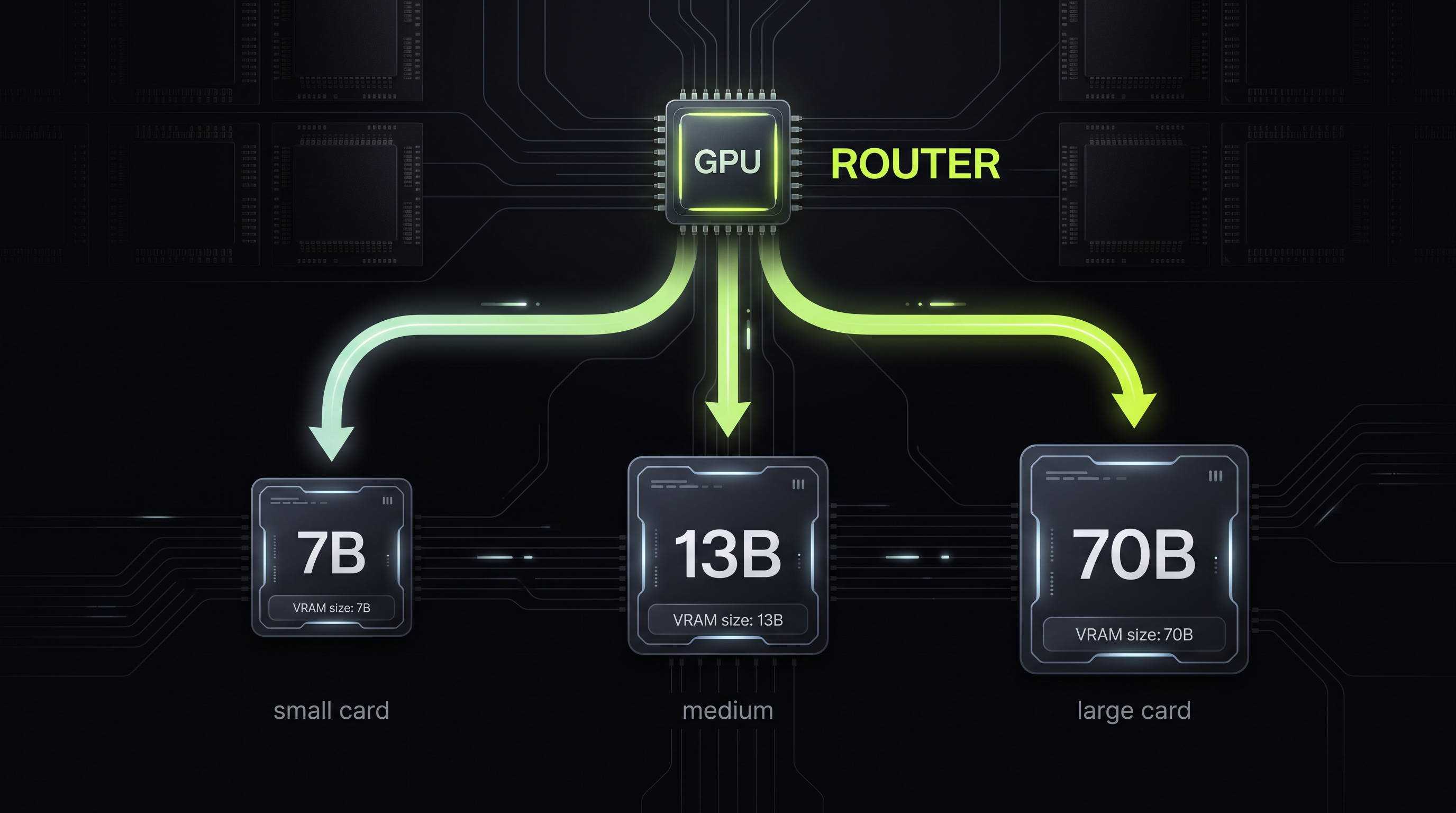
Strata'nın en önemli kısmı bu. Mevcut VRAM'i ölçüp, uygun modeli seçiyor. nvidia-smi veya torch.cuda.mem_get_info() ile anlık free VRAM öğreniliyor:
import subprocess, re
def get_free_vram_gb():
    out = subprocess.check_output(
        ['nvidia-smi', '--query-gpu=memory.free', '--format=csv,noheader,nounits']
    ).decode()
    return int(out.strip().split()[0]) / 1024  # MB → GB

def pick_model(available_gb, model_catalog):
    """En büyük modeli seç ama sınırın %75'ini aşmasın (overhead için)"""
    safe_budget = available_gb * 0.75
    candidates = [m for m in model_catalog if m['vram_gb'] <= safe_budget]
    return max(candidates, key=lambda m: m['params_b']) if candidates else None

catalog = [
    {'name': '7B',  'params_b': 7,  'vram_gb': 4.5,  'path': '...'},
    {'name': '13B', 'params_b': 13, 'vram_gb': 8.5,  'path': '...'},
    {'name': '70B', 'params_b': 70, 'vram_gb': 39.0, 'path': '...'},
]
model = pick_model(get_free_vram_gb(), catalog)
print(f"Selected: {model['name']} ({model['vram_gb']}GB)")
8GB VRAM'de 7B, 12GB'de 13B, 24GB'de 70B (Q3_K_S quantization ile) çalışıyor. Kullanıcı yeni GPU eklerse otomatik daha büyük model yükleniyor.
OpenAI-uyumlu API
En güzel kısım: llama-cpp-python'un OpenAI uyumlu HTTP server'ı var. Tek komutla ayağa kalkıyor:
python -m llama_cpp.server \
  --model ./models/llama-3-8b-instruct.Q4_K_M.gguf \
  --host 0.0.0.0 \
  --port 8000
Artık http://localhost:8000/v1/chat/completions adresinde OpenAI API'sinin aynısı var. Mevcut uygulamadaki base URL'i değiştirmen yeterli:
# OpenAI
client = openai.OpenAI(api_key="sk-...")
# Strata
client = openai.OpenAI(
    base_url="http://localhost:8000/v1",
    api_key="not-needed"  # lokal, auth yok
)
Hiçbir prompt değişikliği, hiçbir fonksiyon imzası değişikliği yok. Production'da OpenAI kullanırken, offline'a düştüğünde veya gizlilik istediğinde Strata'ya yönlendir.
Sonuçlar
Strata'yı 3 ay kullandım. Bulgular:
- Maliyet: OpenAI'ye giden $1,200/ay sıfırlandı. Sadece elektrik: ~$5/ay.
- Gizlilik: Müşteri verisi artık hiç dışarı çıkmıyor. KVKK uyumlu.
- Latency: Lokalde 7B model ~150ms/token, 13B ~80ms/token. OpenAI'ye internet roundtrip'tan kaçtığım için toplam response time 2-3x hızlandı.
- Kalite: 7B quantized model GPT-3.5 seviyesinde. 13B quantized GPT-4'e yakın. 70B çoğu görev için GPT-4'ü geçiyor.
Çıkarımlar
Birincisi: quantization çok ilerledi. Q4_K_M artık production kalitesinde. 2024'te Q4 hâlâ "kabul edilemez" di, 2026'da çoğu kullanım senaryosunda yeterli.
İkincisi: context window tradeoff. 70B modeli 32K context'te çalıştırmak 80GB+ VRAM istiyor. 4K'ya düşürürsen 50GB'a iniyor. Çoğu kullanım senaryosu 8K context'ten fazlasını gerektirmiyor.
Üçüncüsü: OpenAI-uyumlu API hayat kurtarıyor. Bu sayede hybrid strateji uygulayabiliyorsun: önce lokal dene, başarısız olursa OpenAI'ye fallback. Maliyet dramatik düşüyor, performans artıyor, gizlilik korunuyor.
Why I dropped cloud LLMs
My first production LLM app ran on the OpenAI API. I started with GPT-4. When the bill came in, my stomach dropped: $40/day, $1,200/month, just for a demo. As a user grew, cost scaled linearly. Add the privacy problem: customer data leaving for the US, GDPR risk.
Solution: local LLM. llama.cpp lets you run quantized models (Q4_K_M, Q5_K_M) on GPU or CPU. Migrate from OpenAI with zero code changes. Single problem: VRAM management.
llama.cpp basics
llama.cpp is a C++ library for efficient LLaMA inference on CPU/GPU. Thanks to quantization, you can fit a 7B model in 5GB VRAM, 13B in 9GB, 70B in 40GB. The Python binding llama-cpp-python makes it easy to use.
# pip install llama-cpp-python
from llama_cpp import Llama
llm = Llama(
    model_path="./models/llama-3-8b-instruct.Q4_K_M.gguf",
    n_ctx=4096,        # context window
    n_gpu_layers=35,   # how many layers to GPU (depends on VRAM)
    n_threads=8        # CPU threads
)
output = llm("Explain quantum computing in 3 sentences", max_tokens=200)
print(output["choices"][0]["text"])
Running is that simple. The hard part is picking the right model for your VRAM.
VRAM math
Quantized model size has a simple formula:
# Model VRAM (GB) ≈ (params × bits_per_weight) / (8 × 1024³)
def estimate_vram_gb(params_b, quant='Q4_K_M'):
    bits = {'Q4_K_M': 4.5, 'Q5_K_M': 5.5, 'Q8_0': 8.0}.get(quant, 4.5)
    return (params_b * 1e9 * bits) / (8 * 1024**3)

# Examples:
# 7B  Q4_K_M:  3.5 GB
# 13B Q4_K_M:  6.5 GB
# 70B Q4_K_M:  39.3 GB
But the model alone isn't enough. The context window also needs VRAM: ~1KB per token. 4K context = 4MB. 32K context = 32MB. Significant but small next to the model.
KV cache (for attention) is larger: 2 × layers × hidden_size × seq_len × 2 bytes. 7B at 4K context: ~250MB extra. 70B at 32K context: ~5GB.
Routing algorithm
This is the most important part of Strata. It measures available VRAM and picks the appropriate model. Use nvidia-smi or torch.cuda.mem_get_info() for instant free VRAM:
import subprocess, re
def get_free_vram_gb():
    out = subprocess.check_output(
        ['nvidia-smi', '--query-gpu=memory.free', '--format=csv,noheader,nounits']
    ).decode()
    return int(out.strip().split()[0]) / 1024  # MB → GB

def pick_model(available_gb, model_catalog):
    """Pick the biggest model but stay under 75% of the budget (overhead)"""
    safe_budget = available_gb * 0.75
    candidates = [m for m in model_catalog if m['vram_gb'] <= safe_budget]
    return max(candidates, key=lambda m: m['params_b']) if candidates else None

catalog = [
    {'name': '7B',  'params_b': 7,  'vram_gb': 4.5,  'path': '...'},
    {'name': '13B', 'params_b': 13, 'vram_gb': 8.5,  'path': '...'},
    {'name': '70B', 'params_b': 70, 'vram_gb': 39.0, 'path': '...'},
]
model = pick_model(get_free_vram_gb(), catalog)
print(f"Selected: {model['name']} ({model['vram_gb']}GB)")
8GB VRAM runs 7B, 12GB runs 13B, 24GB runs 70B (with Q3_K_S). When a user adds a bigger GPU, the bigger model loads automatically.
OpenAI-compatible API
The nicest part: llama-cpp-python ships with an OpenAI-compatible HTTP server. Single command to launch:
python -m llama_cpp.server \
  --model ./models/llama-3-8b-instruct.Q4_K_M.gguf \
  --host 0.0.0.0 \
  --port 8000
Now http://localhost:8000/v1/chat/completions exposes the same API as OpenAI. You only change the base URL in your existing app:
# OpenAI
client = openai.OpenAI(api_key="sk-...")
# Strata
client = openai.OpenAI(
    base_url="http://localhost:8000/v1",
    api_key="not-needed"  # local, no auth
)
No prompt changes, no function signature changes. In production you use OpenAI; when offline or when you need privacy you route to Strata.
Results
I've used Strata for three months. Findings:
- Cost: $1,200/month to OpenAI became $0. Just electricity: ~$5/month.
- Privacy: Customer data never leaves the machine. GDPR-compliant by design.
- Latency: 7B model locally ~150ms/token, 13B ~80ms/token. Without the internet roundtrip to OpenAI, total response time is 2-3x faster.
- Quality: 7B quantized ≈ GPT-3.5. 13B quantized ≈ GPT-4. 70B beats GPT-4 on most tasks.
Takeaways
First: quantization has come a long way. Q4_K_M is now production quality. In 2024, Q4 was still "unacceptable"; in 2026, it's enough for most use cases.
Second: context window trade-off. Running a 70B model with 32K context wants 80GB+ VRAM. Drop to 4K and you need 50GB. Most use cases don't need more than 8K context.
Third: the OpenAI-compatible API is a lifesaver. With it you can run a hybrid: try local first, fall back to OpenAI on failure. Cost drops dramatically, performance goes up, privacy is preserved.